
Download POI Loader – free Mac Garmin POI management tool
Overview
POI Loader is a lightweight, free Mac application developed by Garmin International for users who need a reliable way to manage Points of Interest (POI) on their Garmin devices. Positioned in the Education & Reference category with a sub‑category focus on Geography, the tool is tailored for hikers, cyclists, travelers, and anyone who enjoys exploring the world with a GPS‑enabled device. Although the program’s install size is not publicly listed, its modest footprint makes it an unobtrusive addition to any macOS environment.
The latest stable release, version 2.2.2, was rolled out on 1 April 2017 and continues to function on macOS X and earlier releases. POI Loader supports three major languages—English, Spanish, and German—ensuring a broad international user base can navigate its interface with ease. While download statistics show modest adoption (one recorded installation since its catalog entry in 2016), the software remains a solid, free option for those seeking a simple, Garmin‑approved method to import and organize POI files without the need for a paid subscription.
Its core purpose is to read standard POI formats (such as CSV, GPX, and Garmin’s proprietary .gpi files) and transfer them securely to compatible Garmin units via USB or Bluetooth, making it an indispensable bridge between desktop planning and on‑the‑road navigation.
Key Features of POI Loader
- Seamless POI Import: Accepts CSV, GPX, and .gpi files, allowing users to bring in custom waypoints, landmarks, and trailheads directly from mapping services.
- Multi‑Language Support: Interface available in English, Spanish, and German, catering to a diverse global audience.
- Garmin Device Compatibility: Works with a wide range of Garmin handhelds, automotive navigation units, and wearables that support POI loading.
- Secure Transfer Protocol: Uses Garmin’s verified communication channels to ensure data integrity during the upload process.
- Lightweight Design: Minimal system resource usage, making it suitable for older Mac hardware and ensuring fast load times.
- Automatic Update Checks: Notifies users when a newer version is available, helping maintain security and feature parity.
- Custom Tagging: Allows users to assign categories, icons, and notes to each POI for easier identification on the device.
- Export Capability: Enables exporting of loaded POIs back to CSV or GPX for backup or sharing with other platforms.
- Free of Charge: No hidden fees or trial periods; POI Loader remains completely free for personal use.
Each of these features is crafted with the end‑user in mind. For example, the custom tagging system empowers hikers to differentiate between “water sources,” “campsites,” or “viewpoints” with distinct icons, reducing the chance of confusion when navigating remote terrain. The secure transfer protocol, built on Garmin’s proprietary standards, guarantees that the POI data you load will not be corrupted or lost during the sync, which is crucial for safety‑critical applications. Moreover, the automatic update checks, while simple, ensure that users are always protected against potential vulnerabilities that could arise from outdated software. Together, these capabilities make POI Loader not just a utility but a comprehensive solution for anyone who relies on accurate, up‑to‑date points of interest in the field.
Installation & Usage Guide
Downloading the Installer
Begin by visiting Garmin’s official support page or a trusted software repository that hosts the POI Loader dmg file. Click the “Download” button; the file will be saved to your Downloads folder. Because POI Loader is a free application, there are no purchase steps or license keys required.
Installing on macOS
Once the dmg file is downloaded, double‑click it to mount the virtual disk. You will see the POI Loader icon alongside an Applications shortcut. Drag the POI Loader icon into the Applications folder. macOS may display a security warning the first time you open the app because it is not signed by the Apple App Store. To proceed, open System Preferences → Security & Privacy → General and click “Open Anyway.” This step only needs to be performed once.
Initial Launch and Setup
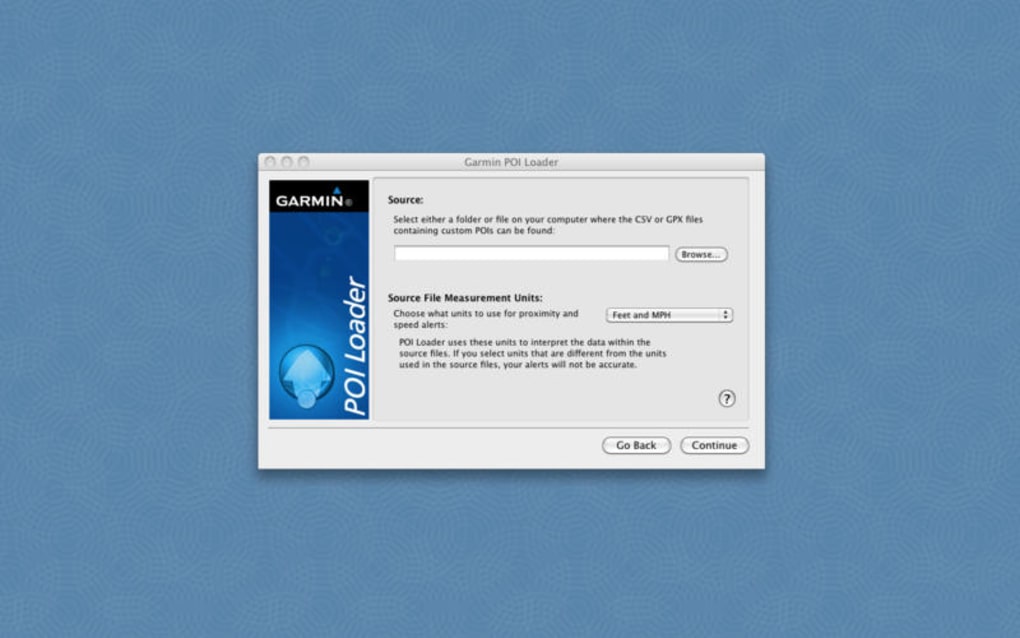
Launch POI Loader from your Applications folder. On the first run, the program will ask for permission to access removable drives. Grant the permission so the software can communicate with your Garmin device. The main window is divided into three panels: the left panel for selecting the source POI file, the middle panel for previewing the points, and the right panel for device selection.
Loading POIs
Click “Choose File” and navigate to your CSV, GPX, or .gpi file. POI Loader will parse the file and list each point with its name, coordinates, and any attached metadata. Use the filter options to narrow down the list if you only need a subset (e.g., only “camping sites”). After confirming the selection, connect your Garmin device via USB or enable Bluetooth pairing if supported. The device should appear in the right‑hand dropdown; select it and click “Upload.” The progress bar will indicate the transfer status, and a confirmation dialog will appear once the upload completes successfully.
Troubleshooting Common Issues
If the device does not appear, ensure that the Garmin driver is installed (Garmin provides a Mac driver that can be downloaded from their website). For Bluetooth connections, verify that the device is in pairing mode and that macOS Bluetooth is turned on. In case of a “file format not recognized” error, double‑check that your POI file adheres to the supported schema—columns should be labeled “Name,” “Latitude,” “Longitude,” and optional “Description.” Finally, if the upload stalls, disconnect and reconnect the USB cable, then restart POI Loader.
Overall, the installation and usage process is straightforward, requiring only a few clicks to get your custom POIs onto a Garmin navigation unit. The intuitive interface, combined with clear on‑screen prompts, ensures that even users with limited technical experience can manage their geographic data efficiently.
Compatibility, Pros & Cons
POI Loader is built specifically for macOS X and earlier versions, making it a native solution for Mac users who own Garmin devices. The application runs smoothly on macOS 10.9 (Mavericks) through macOS 10.15 (Catalina). While the software does not have an official Windows or Linux version, the underlying POI file formats (CSV, GPX) can be edited on any platform before being imported via POI Loader on a Mac.
Pros
- Free and No Ads: Completely cost‑free with no hidden commercial prompts.
- Garmin‑Certified Transfer: Uses Garmin’s official communication protocol, ensuring reliable data sync.
- Multi‑Language Interface: Supports English, Spanish, and German, widening accessibility.
- Lightweight Footprint: Minimal impact on system resources, suitable for older Macs.
- Customizable POI Tags: Users can assign categories and icons for better on‑device organization.
Cons
- Mac‑Only: No native Windows or Linux version, limiting cross‑platform usage.
- Outdated UI: The visual design has not been refreshed since the 2017 update, which may feel dated to modern users.
- Limited Documentation: Official support articles are sparse, requiring users to rely on community forums for advanced troubleshooting.
- No Automatic Backup: Users must manually export POIs for backup; the app does not store a cloud copy.
- Rare Updates: The last update was in 2017, raising concerns about long‑term compatibility with newer Garmin firmware.
Despite these drawbacks, the core functionality remains solid. For Mac users who need a straightforward way to load POIs onto Garmin devices without paying for premium software, POI Loader still delivers a dependable experience. The pros, especially the free price tag and Garmin‑certified transfer, outweigh the cons for most hobbyists and occasional travelers.
Frequently Asked Questions
Can I use POI Loader with the latest macOS versions?
POI Loader officially supports macOS X up to Catalina (10.15). While it may launch on newer versions like macOS Big Sur or Monterey, some users have reported UI glitches due to the outdated framework. If you encounter issues, consider running the app in compatibility mode or using an older Mac.
What file formats are accepted for POI import?
The program accepts CSV, GPX, and Garmin’s proprietary .gpi files. CSV files should contain columns for “Name,” “Latitude,” “Longitude,” and optionally “Description.” GPX files must follow the standard GPS Exchange format with waypoints defined.
Is POI Loader safe to use with my Garmin device?
Yes. POI Loader communicates with Garmin devices using the official Garmin data transfer protocol, which ensures that POI data is written securely and without corrupting the device’s existing navigation files.
Do I need an internet connection to load POIs?
No. POI Loader operates entirely offline. The only time an internet connection is required is when you download the installer or check for software updates.
Can I export POIs after they have been loaded onto my device?
Yes. POI Loader includes an export function that lets you save the currently loaded POIs back to CSV or GPX format for backup or sharing with other applications.
Ready to get your custom points of interest onto your Garmin navigator? Download POI Loader now and start building a richer, more personalized navigation experience—completely free and secure.







